

Phone to SIM. SIM to phone.
Move contacts onto the one kind of storage that survives a dead phone, a wiped screen or a new handset — the SIM card. Copy to SIM Card shows what fits, previews the names that will be written, and reports back on every entry.
- 3ways to copy
- 32interface languages
- 0address books uploaded

Android 8.0 or later · On-device · No account, no ads
What you can do
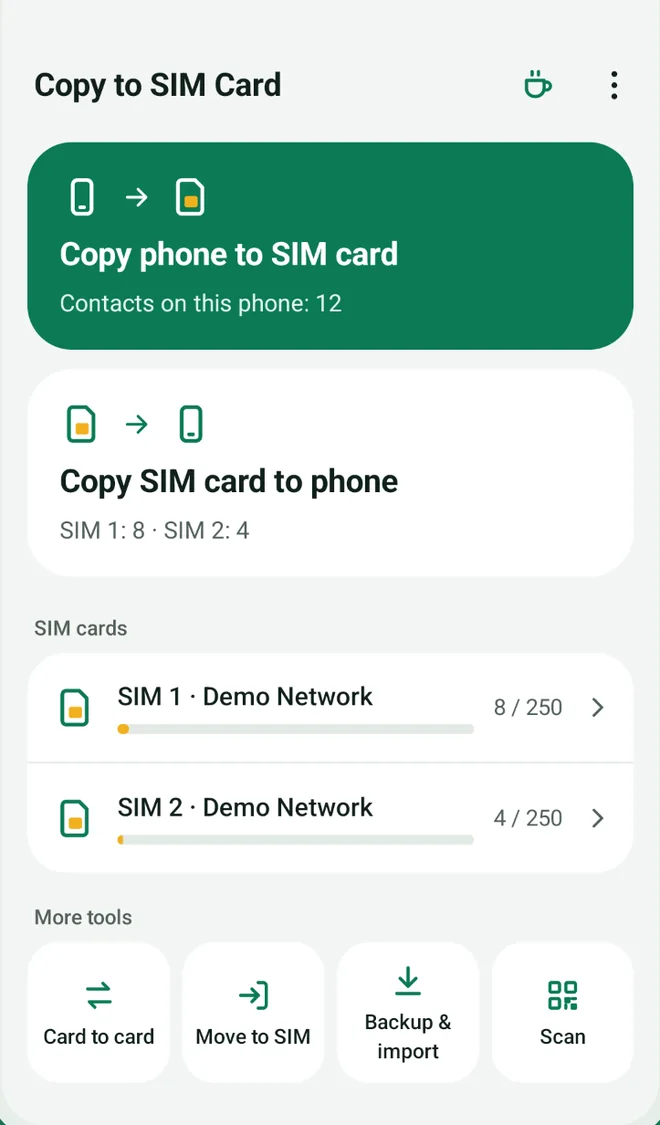
Copy in either direction, move contacts off the phone, back them up and share them — with the same checks and the same result list.
Phone to SIM
Pick contacts from your phone or a contact account, choose the destination card, and write them. The app tells you how many contacts the phone holds before you start.
SIM to phone
Read what is on the card back into your phone or a contact account — useful when you have just moved a card into a new handset.
Card to card
Copy entries between two supported SIM cards in the same phone, when the device can see both of them.
Move to SIM
Copies the numbers to the card and removes the phone contact only after the entry is written and read back — or was already on the card.
Back up and import
Export contacts as vCard files, import vCards again, or send a contact out through Android’s share sheet.
Scan and share
Create a contact QR code, or scan someone else’s to save the details. The scanner works offline once camera permission is granted.
Check before you write
SIM cards are small and strict. The app shows what will happen before anything is written, so a copy does not turn into a surprise.
-
Capacity, before anything is written
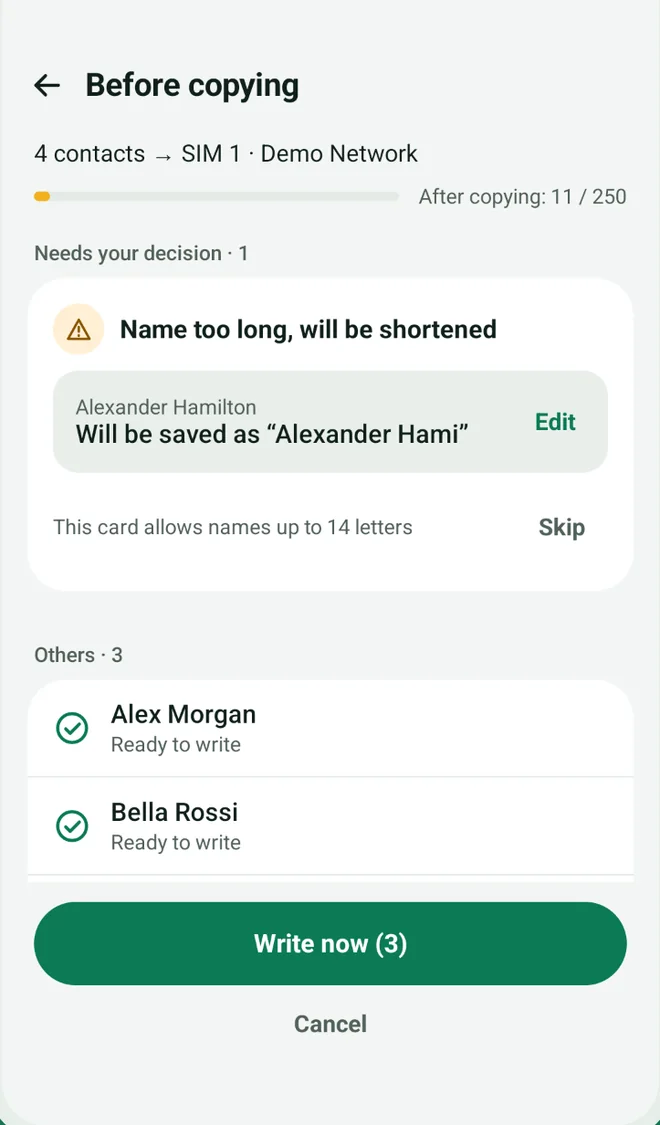
See how many entries the card holds and how many are already used — for example eight of 250 — and how full it will be after copying.
-
Names that will be shortened
Cards allow a limited number of characters per name. Long names are previewed with the exact text that will be saved, and you can edit them or skip the contact.
-
Entries that already exist
Contacts already on the card are skipped instead of duplicated, and the result list says so.
-
One contact, several numbers
When a phone contact has more than one number, the app can split it into separate SIM entries with number-type suffixes.
-
Characters the card cannot store
Unsupported characters are flagged before writing, not silently dropped along the way.
Real screens from the app
Every step shows the numbers that matter: what the card holds, what will be written, and what happened in the end.
How it works
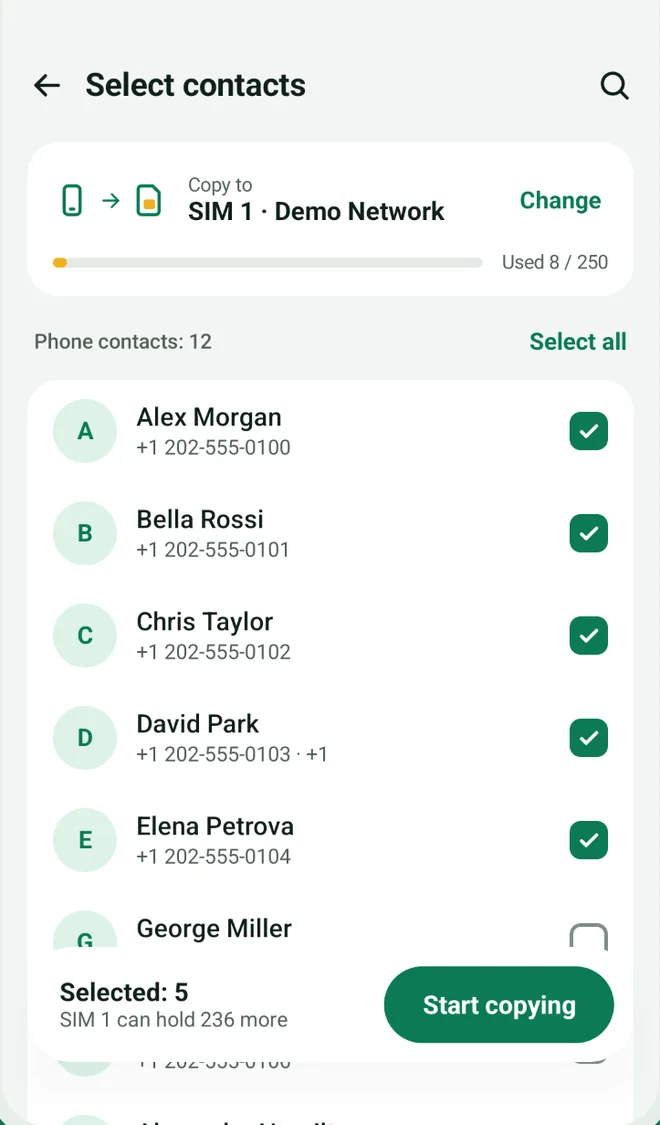
Three steps, and nothing written until you have seen the preview.
Pick the direction
Phone to SIM, SIM to phone or card to card. Choose which SIM card to read from or write to.
Select and review
Tick the contacts you want. The app previews names, capacity and anything that needs a decision.
Write and check the result
Entries are read back after writing. The result list shows what succeeded, what was skipped and what failed, with a retry for the failures.
Know what a SIM can hold
A SIM card is a safety net, not a full contact backup. These are the limits the app will show you rather than hide.
A name and a number
A SIM entry usually stores one name and one number. Photos, email addresses, postal addresses and notes stay on your phone.
Not every card has a phonebook
Some SIM cards and eSIM profiles offer no contact storage at all. If the card has no phonebook, there is nothing to read or write.
Capacity set by the carrier
How many entries fit, and how long a name can be, are set by the card and the carrier. Some phones cannot report capacity to any app.
Requires Android 8.0 or later. SIM access also depends on the phone, the Android version and the carrier.
Your address book stays yours
Copying and managing contacts happens on your phone. Nothing in your address book is uploaded to us.
On your device
Reading the phone, reading the card and writing entries all happen locally. The app works without a network connection.
No account
No sign-up, no email address and no profile. The app does not need to know who you are to copy a contact.
Analytics you can switch off
Usage analytics and crash reports help fix problems and can be turned off in Settings at any time. They never include your contacts.
Questions
Will my contacts keep their photos and email addresses?
No. A SIM entry stores a name and one number. Photos, email addresses, postal addresses and notes stay in your phone’s contacts, which is why keeping a vCard export as well is a good habit.
What happens to names that are too long?
They are shortened to fit the card’s limit. Before anything is written you see the exact text that will be saved, and you can edit the name or skip that contact.
What if the SIM is nearly full?
The app shows how many entries the card holds and how many will be used after copying. Entries that cannot fit are reported instead of being written over something else.
Does copying delete contacts from my phone?
Only in Move to SIM, and only after the number has been written and read back, or was already on the card. A normal copy leaves phone contacts untouched.
Can one contact with several numbers go on the card?
Yes, as separate entries. The app can split a contact into several SIM entries with number-type suffixes such as Mobile or Work.
Does it work with eSIM?
Only if the eSIM profile exposes a contact phonebook. Many do not, and in that case the app has nothing to read or write on that profile.
Which Android versions are supported?
Android 8.0 or later, with a SIM card that supports contact storage. Behaviour can vary with the phone, the Android version and the carrier.
Is it free?
Yes. Every feature is available without a purchase and without an account. An optional one-time tip through Google Play supports development.
Your contacts, on the card.
Free on Android. Pick a direction, check what fits, and copy.